Today
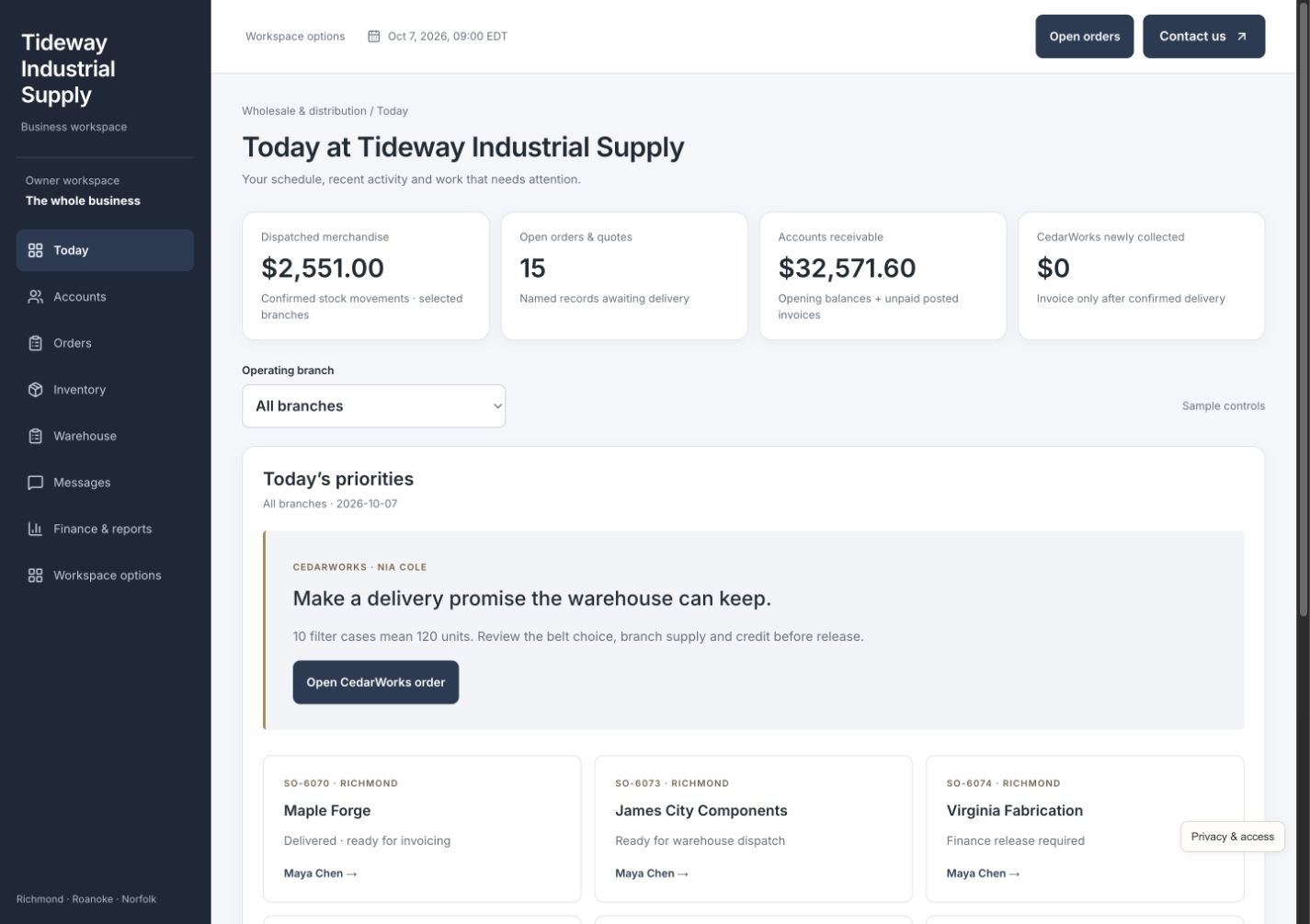
See orders needing attention, delivery cutoffs, shortages, and credit holds across branches. Open the underlying record and next decision without asking each department for a separate update.
Custom software for established distributors
Account pricing, stock, purchasing, warehouse work, deliveries, and receivables—together in a system built around the way your distribution business works.
A working business. Fictional data. Built to show what’s possible.
One situation. Every next step connected.
Nia orders filters, belts, and consumables for her business. Sales knows the customer, but stock is split across branches and one item needs a different plan. Confirm the quantities, price, credit decision, and delivery promise before releasing work to the warehouse.
Confirm that ten filter cases means 120 units, then review the belts and consumables with Nia's account pricing. Compare the request with available stock at each branch. Show the shortage before promising the full order, with reserved quantities separated from stock still free to sell.
Offer an appropriate substitute or a dated backorder and record Nia's explicit choice. Review the credit exception before releasing the approved order. Sales, the purchaser, finance, and the warehouse can see the same agreed items, terms, and promised delivery window.
Reserve local stock and arrange the remaining filters from another branch. Dispatch the transfer, then confirm the full quantity received at the fulfilling branch. In-transit stock stays unavailable for picking; sending a transfer is not the same as receiving it. Separately, Purchasing records actual supplier receipts and keeps any shortage visible for replenishment.
Use the warehouse view to verify the approved items and quantities, stage the order, and record dispatch. Record proof of delivery against the original promised window. Picking, dispatch, and delivery remain separate milestones, with the customer's approved substitute or backorder visible throughout.
Invoice only delivered quantities. On the main path, review $3,400 invoiced against $2,550 in modeled costs: $850 contribution before overhead. With Net 30 terms, $0 has been newly collected; the invoice remains a receivable. Turn the buying history into a fresh repeat quote using current prices and availability.
Fictional walkthrough, not a client result. Ten cases contain 120 filter units in this example. The main completed order has $3,400 invoiced, $2,550 in modeled costs, and $850 contribution before overhead—not net profit. Newly collected money is $0 under Net 30 terms. An invoice is not a receipt. Substitute and backorder decisions can change the delivered quantities and outcome. Figures are sample data, not a promised return. No real order is dispatched or customer charged.
The whole business, together
A reliable delivery promise depends on more than the sales order. Give account managers, purchasing, branch teams, the warehouse, and finance the same current information—and a clear next action when something changes.
See orders needing attention, delivery cutoffs, shortages, and credit holds across branches. Open the underlying record and next decision without asking each department for a separate update.
Keep purchaser contacts, delivery sites, account prices, terms, balances, and previous orders together. Prepare a fresh repeat quote with today's prices and availability instead of copying an old promise.
Move a request through a reviewed quote, customer approval, and released sales order. Keep case sizes, allocations, substitutions, and dated backorders attached to the customer's actual decision.
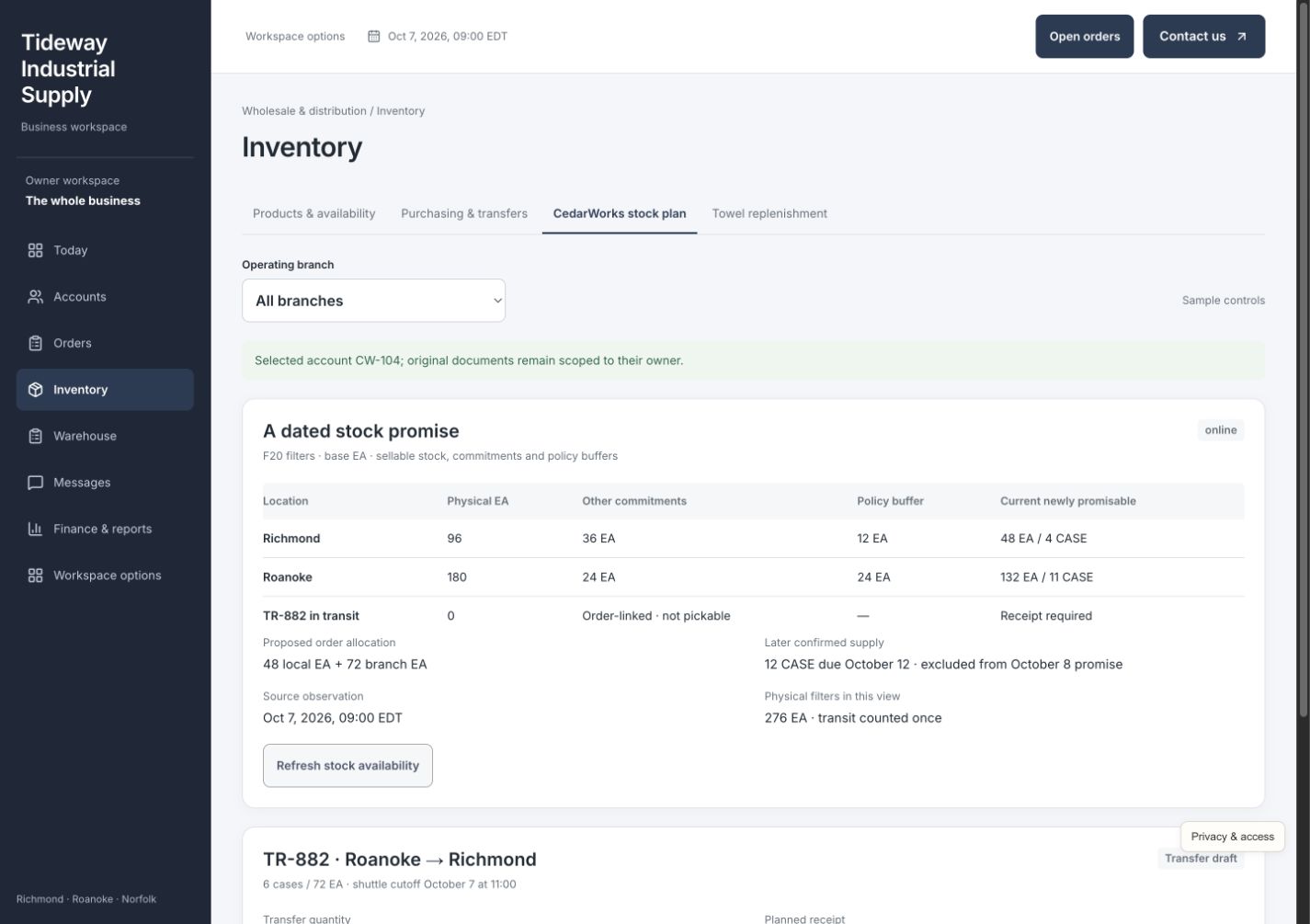
Distinguish on-hand, reserved, available, and in-transit quantities across three branches. Reserve the right stock and complete branch transfers through dispatch and receipt before the warehouse can use it.
Keep supplier confirmations, purchasing, expected arrivals, and actual receipts with the stock they affect. Surface short receipts and replenishment needs before they become another missed customer commitment.
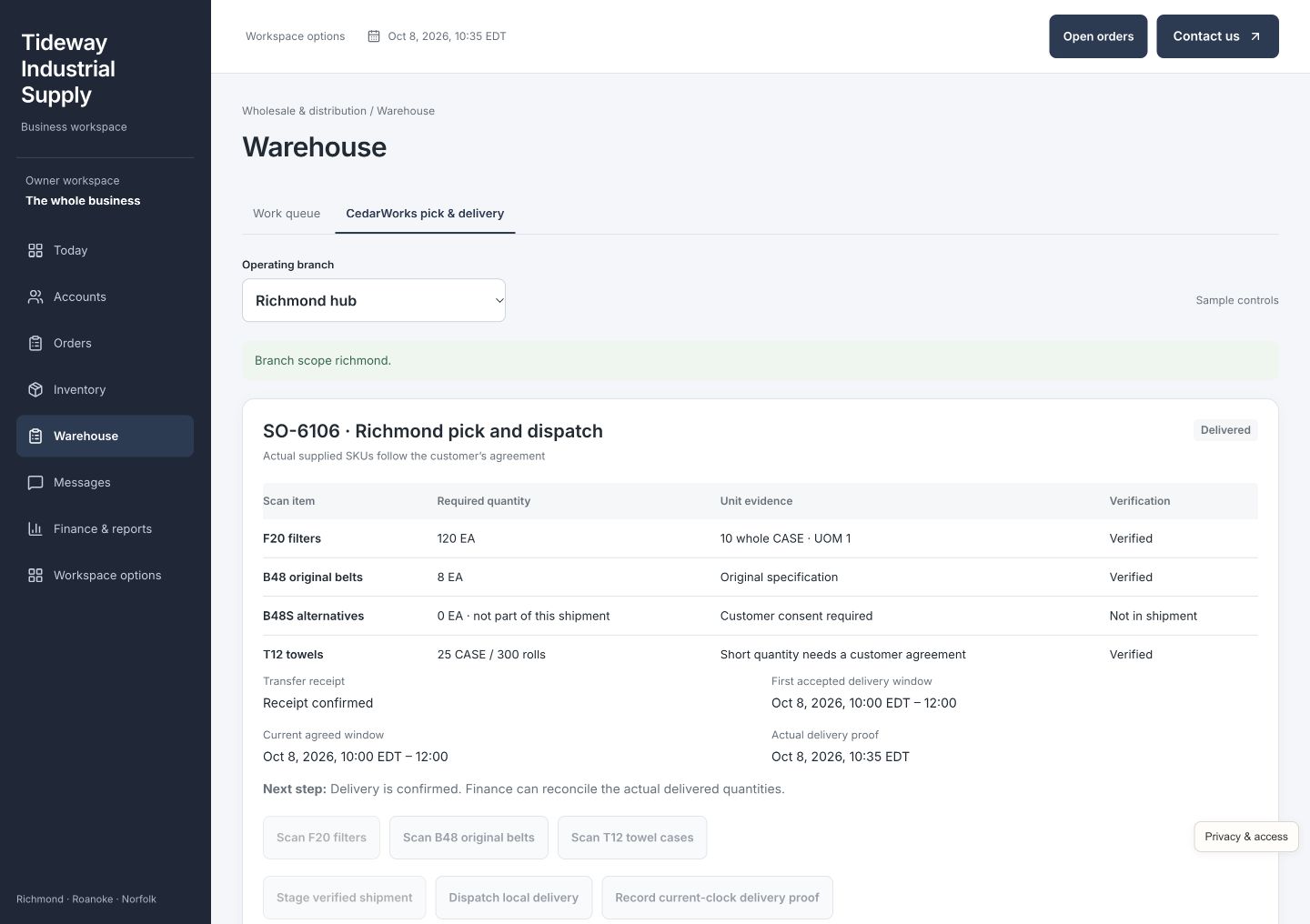
Work through pick checks, exceptions, staging, dispatch, and delivery proof with large, focused controls. Verify the approved items and quantities while keeping the original delivery promise visible.
Keep purchaser choices, supplier updates, credit decisions, and delivery changes linked to the order. The next colleague can see what was agreed without searching separate inboxes or asking the customer again.
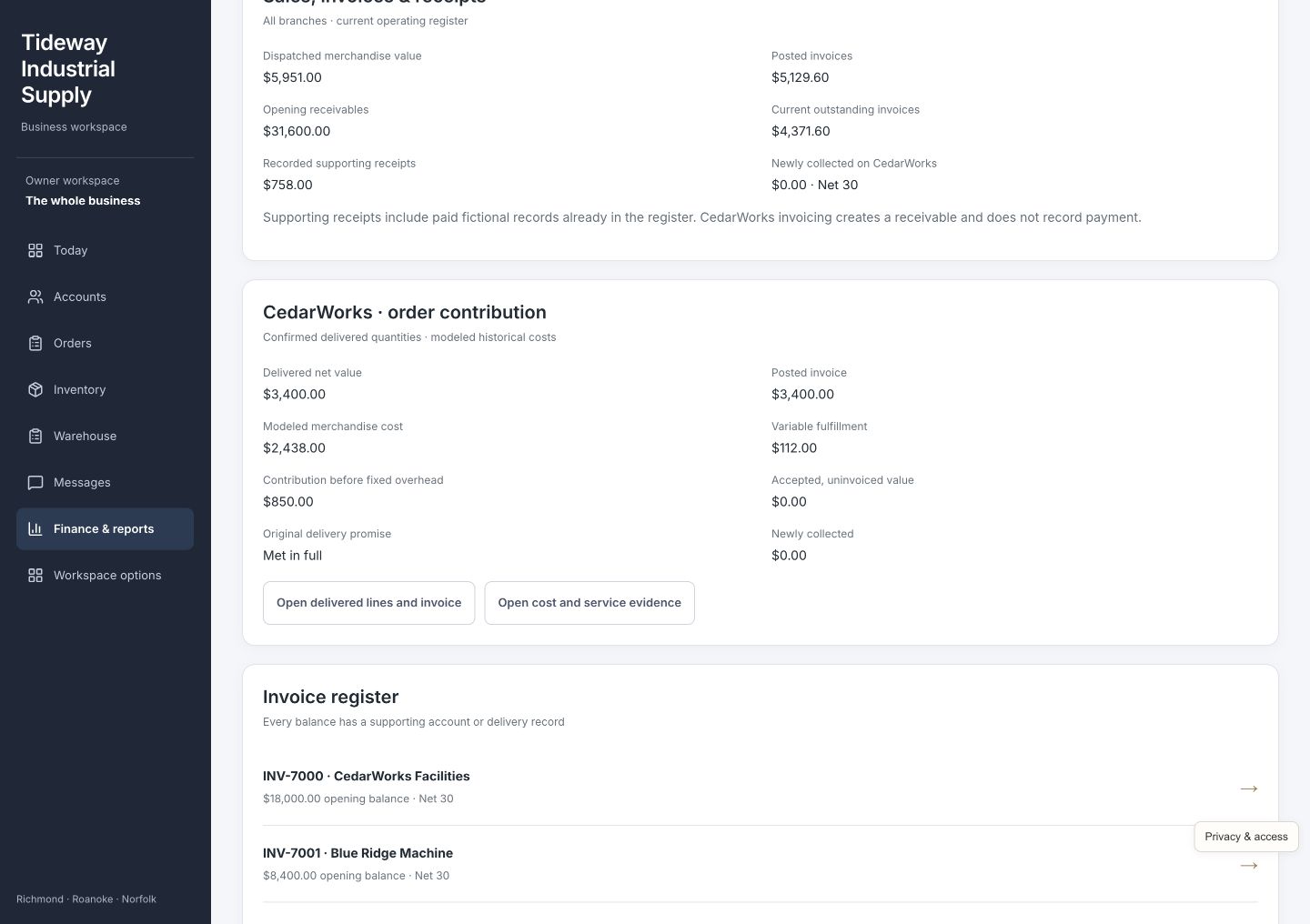
Review credit exceptions, invoices, receivables, fill rate, delivery performance, and account trends. Trace contribution to the modeled costs behind it, and keep invoiced amounts separate from collected receipts.
See the work getting done
Open any screenshot for a closer look. On a small screen, swipe across the preview.
For sales and purchasing
Compare the request with branch stock, reservations, and incoming transfers. Ten cases means 120 units—not ten filters. Make the shortage visible, record the customer's substitute or backorder choice, and give the warehouse one approved order to fulfill.
For the warehouse
Receive the branch transfer before picking, verify the approved order, then stage and dispatch it. Record delivery separately, so the office knows what left the warehouse and what the customer actually received.
For the owner and finance team
See $3,400 invoiced, $2,550 in modeled costs, and $850 contribution before overhead for the main completed order. Net 30 keeps the full invoice visible as a receivable, with $0 newly collected. Follow the records behind the numbers instead of relying on a sales total alone.
Built for the way you work
Tideway Industrial Supply is a fictional distributor with three branches, account customers, industrial products, purchasing, transfers, and warehouse work. Its example shows how a customer's order can stay connected across departments. Your business does not have to sell the same products or use these exact rules.
Your system can reflect your case sizes, product units, account pricing, credit terms, substitute approvals, supplier lead times, stock policies, branch responsibilities, delivery windows, warehouse checks, and reporting. We build for established distributors where a busy team and valuable customer commitments need dependable coordination.
We review your existing ERP, accounting, inventory, purchasing, shipping, and customer-ordering software before deciding what to connect or build. We check what your current providers support and agree on the source of truth for prices, stock, orders, and payments as part of your custom implementation.
Walk through a real day with your team. Find the repeated admin, delays, and missing information that deserve attention.
Build around your operating rules. Check what your current providers support and agree which systems to connect.
Help the team use it comfortably, review the work in practice, and refine the steps that matter most.
Before you explore
No. Its accounts, products, orders, stock, messages, invoices, and delivery records are fictional. You can explore the connected workflow without dispatching real goods, contacting a customer, or collecting money. The quantities and financial results are sample data, not a claim about a client's results.
No. Industrial supplies make case sizes, account pricing, branch availability, and delivery promises easy to demonstrate. Your build can reflect the products, purchasing rules, customers, locations, and fulfillment process of your own wholesale or distribution business.
Often, yes. We start with what works and check what your current providers support. Connections, responsibilities, and data ownership are agreed for your implementation; the demo does not imply every ERP, accounting, inventory, or shipping platform is already integrated.
You enter Nia's guided order story, then can explore the full working dashboard. No account, password, or email verification is needed. CIS receives your details and may follow up about your interest; optional demo activity is linked to your inquiry without sending contact details to analytics. Access is remembered in this browser for 30 days.
Picture a better business day
Follow Nia's order from the first request to the invoice, then explore the accounts, stock, warehouse, and reporting behind it.