Today
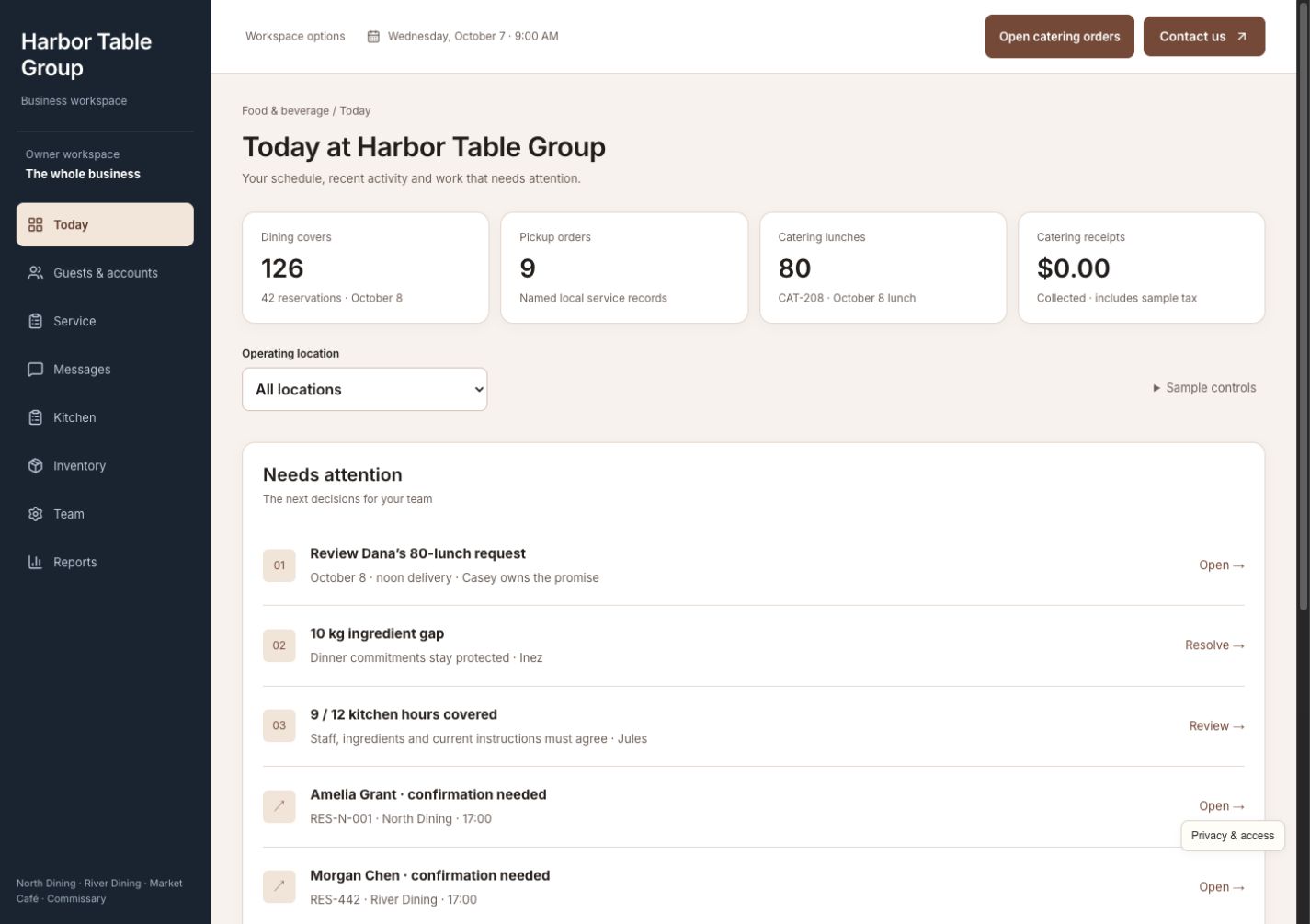
See service commitments, catering decisions, stock shortages, and staffing gaps across locations. Open the relevant order or task and find the next responsible person without collecting updates from separate systems.
Custom software for established restaurant groups
Catering, service, kitchen preparation, ingredients, staffing, and daily performance—together in a system built around the way your restaurants work.
A working business. Fictional data. Built to show what’s possible.
One situation. Every next step connected.
Dana requests 80 lunches at $28 each. It is a $2,240 opportunity, but the kitchen already has dinner commitments. Review what the order will cost, what ingredients are truly available, and who can prepare it before making a promise the whole team must keep.
Review Dana's 80 lunches, revised ingredient costs, delivery window, and kitchen capacity. Make an explicit pricing decision before confirming the quote. Record customer acceptance and the deposit separately: an accepted order does not mean the full amount has been collected.
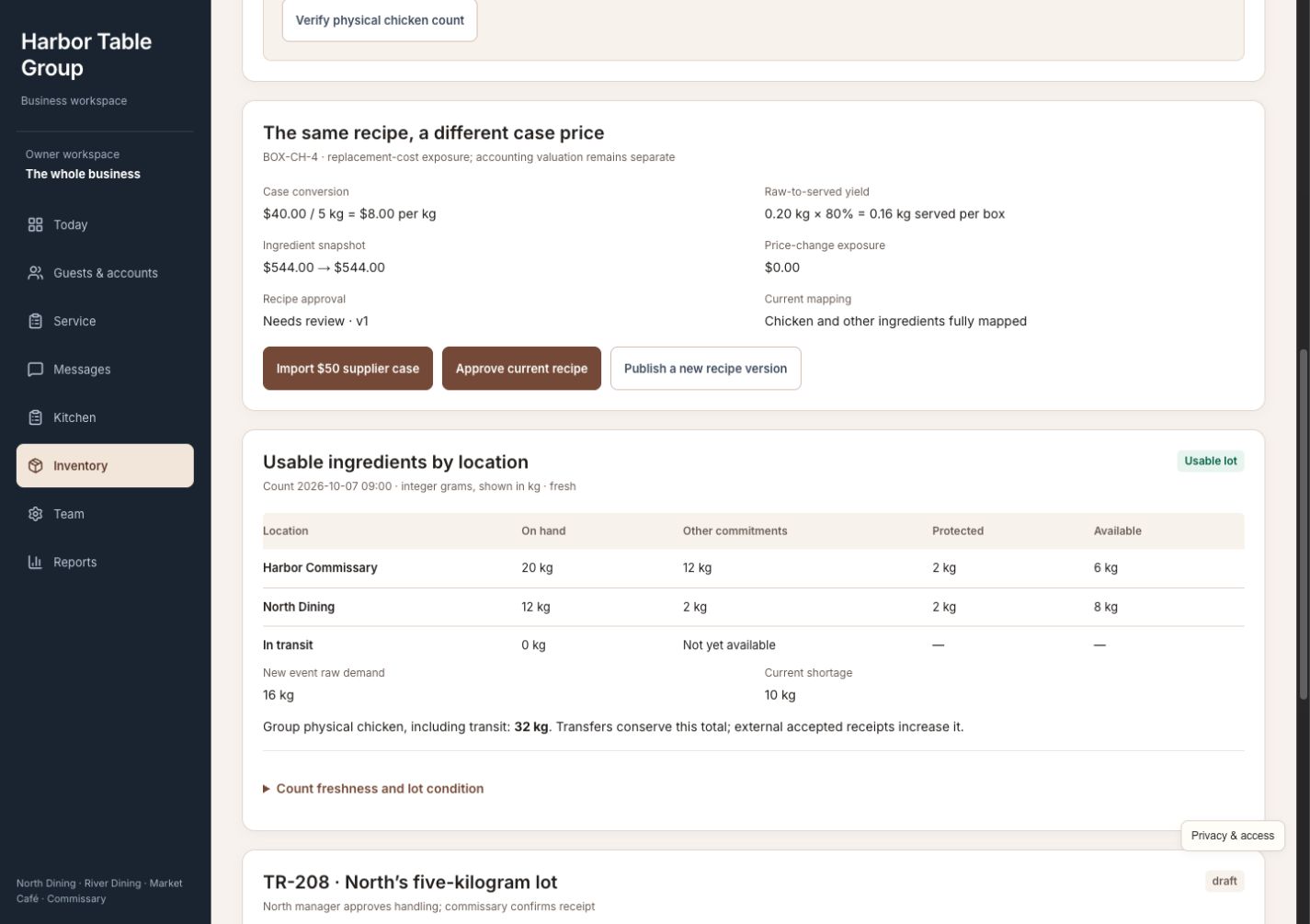
The order needs 16 kg of an ingredient, but only 6 kg is available after existing dinner commitments. Arrange a 5 kg transfer and a 5 kg purchase. Receive the actual quantities before using them; stock in transit is not available for preparation. A short receipt leaves a shortage to resolve.
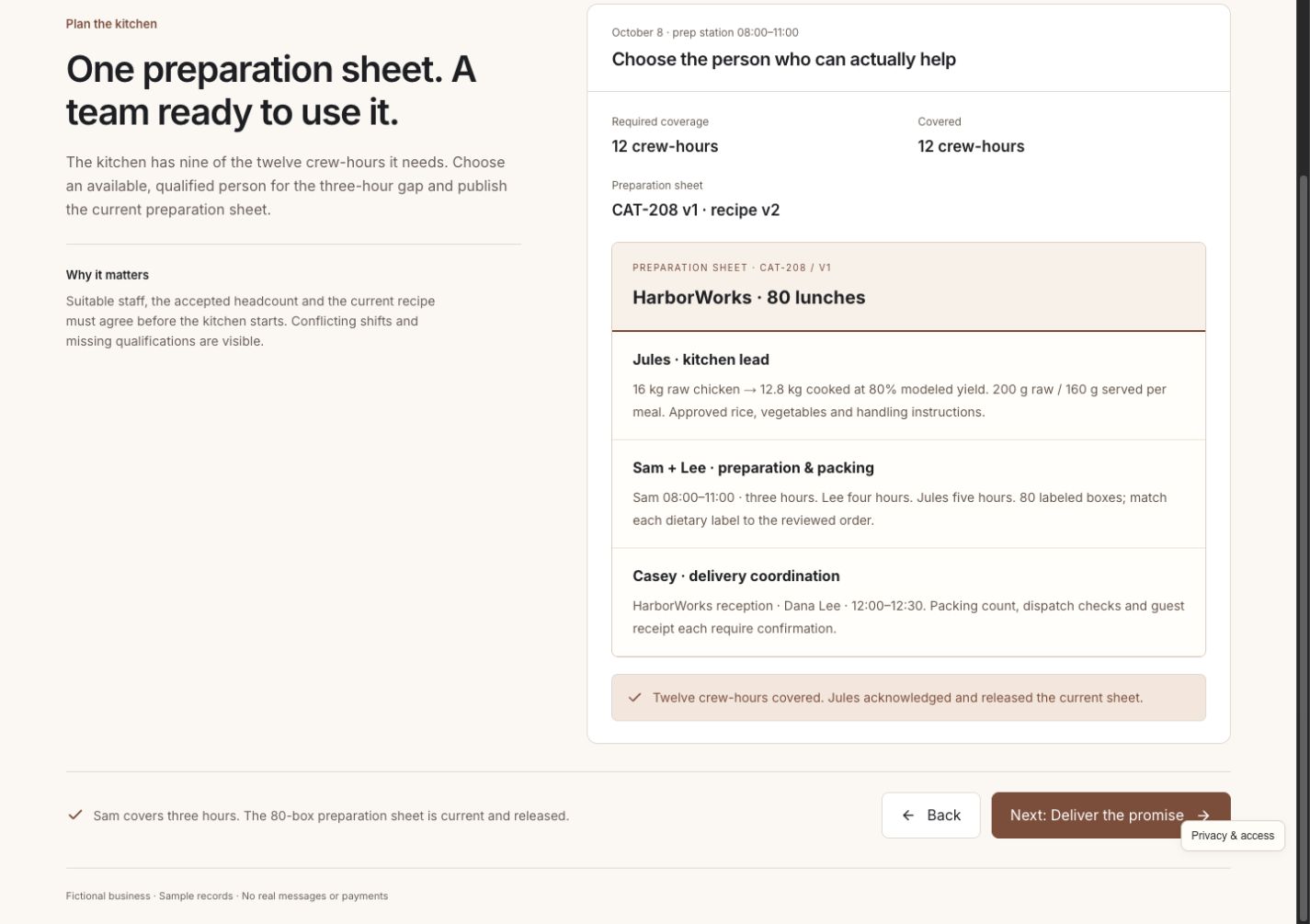
Resolve the three-hour staffing gap with someone qualified and available, without taking them from an existing assignment. Publish one preparation sheet with meal quantities, responsibilities, packing, and delivery details so the kitchen and service team use the same instructions.
Confirm all 80 meals are packed, complete the dispatch checks, and record Dana receiving the order. Packing, dispatch, and customer receipt remain separate milestones. The team can see where the order stands rather than treating a finished preparation list as a completed delivery.
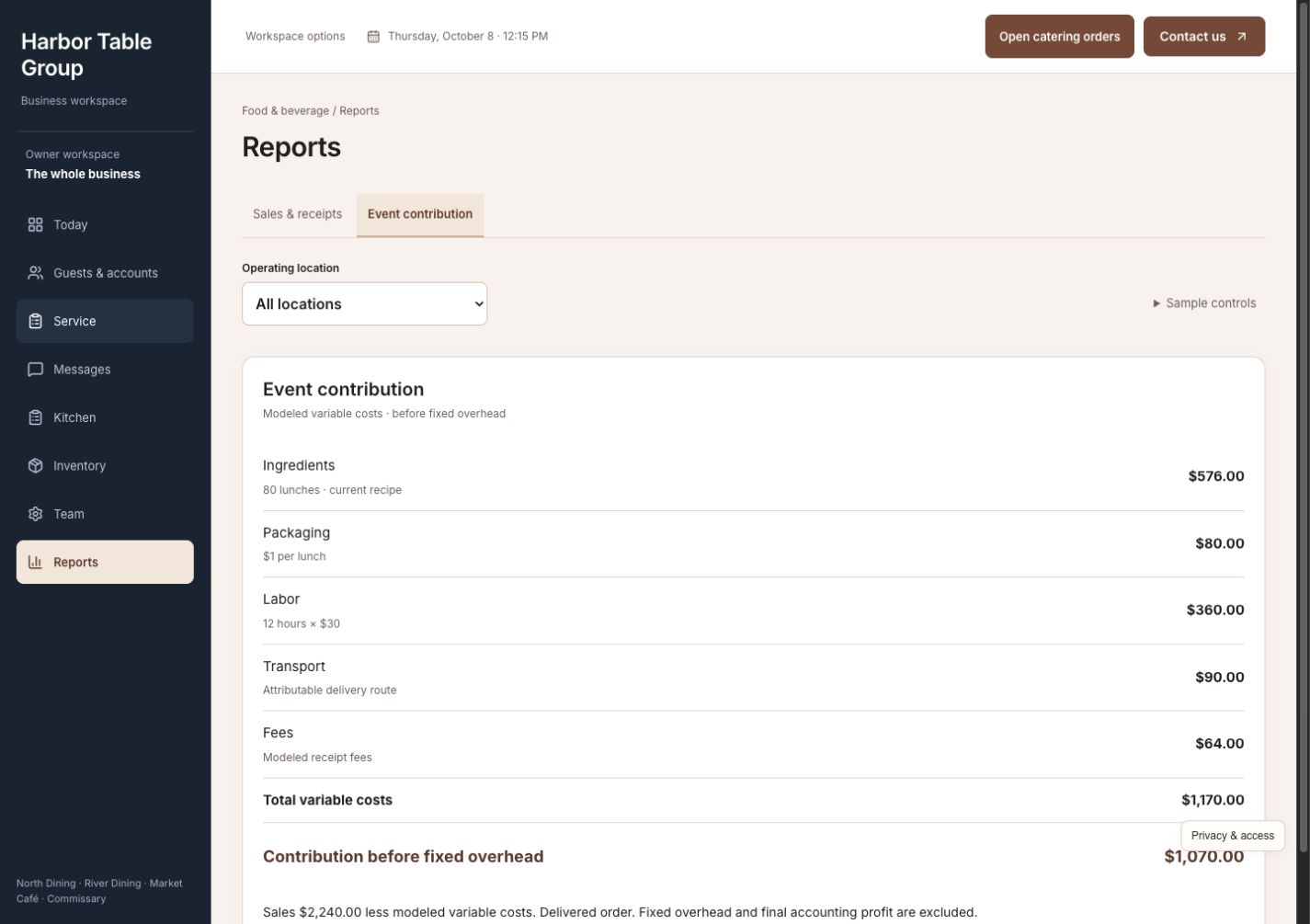
Reconcile the deposit and remaining balance without counting either twice. Review $2,240 in sales against $1,170 in modeled variable costs: $1,070 contribution before fixed overhead. Show tax separately and keep any unpaid balance visible instead of reporting it as collected money.
Fictional walkthrough, not a client result. The example has $2,240 in sales, $179.20 in sample tax at 8%, and a $2,419.20 total. A $604.80 deposit leaves $1,814.40 to collect. Sales, customer acceptance, deposits, and collected receipts are separate. The modeled $1,070 contribution is before fixed overhead, not net profit. It depends on the example's quantities and costs; it is not a promised return. Tax is shown separately. No real customer is contacted or charged.
The whole business, together
A catering commitment affects more than a calendar. Give managers, the kitchen, service staff, and the owner one place to coordinate the work while protecting the stock and people already promised elsewhere.
See service commitments, catering decisions, stock shortages, and staffing gaps across locations. Open the relevant order or task and find the next responsible person without collecting updates from separate systems.
Browse reservations, pickups, and catering orders with their customer records and delivery windows. Review revised headcounts and order stages before confirming what the kitchen can provide.
Keep individual guests and business customers with their order history, preferences, and service issues. Give the next colleague the context to handle a repeat request without asking the customer to start again.
Keep quote decisions, customer acceptance, headcount changes, pickup details, and delivery updates with the order. The kitchen and front desk can see what was agreed and which questions still need an answer.
Turn the agreed order into recipes, preparation quantities, responsibilities, packing, and delivery handoffs. Keep production, packed meals, dispatch, and customer receipt distinct so progress is visible through the entire job.
See ingredients by location, existing commitments, transfers, purchases, actual receipts, counts, and waste. Resolve a short receipt before preparation and protect stock already allocated to dinner service.
Compare required work with staff availability, qualifications, and current assignments. Fill a coverage gap with a suitable person and carry the agreed responsibilities into the preparation plan.
Review sales, deposits, collected receipts, unpaid balances, labor, waste, and location performance. Open the modeled ingredient and labor costs behind an order's contribution before overhead instead of confusing sales with what the order earned.
See the work getting done
Open any screenshot for a closer look. On a small screen, swipe across the preview.
For the manager
Review Dana's quote, changed costs, delivery window, and ingredient commitments together. Only 6 kg is free for an order needing 16 kg. The transfer and purchase address the shortage while dinner's stock remains committed to dinner.
For the kitchen and service team
Resolve the three-hour coverage gap, then publish the meal quantities, responsibilities, packing checks, and delivery details. The same order carries from preparation to customer receipt, with clear milestones and no need to rebuild the instructions at each handoff.
For the owner
Trace the $2,240 order to $1,170 in modeled variable costs and $1,070 contribution before fixed overhead. Review the deposit, balance, and collected receipts separately, with tax shown on its own. The result makes sense beyond the sales total.
Built for the way you work
Harbor Table Group is a fictional restaurant business with multiple locations, regular service, pickups, and catering commitments. Its example includes ingredient shortages, coverage needs, revised headcounts, and unpaid balances. The details show how connected operations can work; yours do not have to follow this exact model.
Your system can reflect your menus, recipes, preparation rules, service and delivery windows, order approvals, staffing qualifications, purchasing, locations, payment stages, team responsibilities, and reporting. We focus on established restaurants and food businesses where a busy team needs dependable coordination as the operation grows.
We review your existing POS, reservations, ordering, inventory, payments, and accounting software before agreeing what to connect or build. We check what your current providers support, decide which promises need approval, and make those connections part of your custom implementation.
Walk through a real day with your team. Find the repeated admin, delays, and missing information that deserve attention.
Build around your operating rules. Check what your current providers support and agree which systems to connect.
Help the team use it comfortably, review the work in practice, and refine the steps that matter most.
Before you explore
No. The customers, orders, recipes, stock, staffing, messages, and payments are fictional. You can try the connected workflows without contacting real customers or collecting money. Quantities, prices, costs, and outcomes are sample data, not a claim about a client's results.
No. Catering makes the connection between pricing, ingredient commitments, staff, delivery, and payments easy to see. The full dashboard also includes regular service, reservations, pickups, guests, and location operations. Your build would reflect your own restaurant or food business.
Often, yes. We begin with what works and check what your current providers support. Connections and responsibilities are agreed for your implementation; the demo does not imply every POS, reservation, payment, or accounting platform is already integrated.
You enter Dana's guided catering story, then can open the full working dashboard. No account, password, or email verification is needed. CIS receives your details and may follow up about your interest; optional demo activity is linked to your inquiry without sending contact details to analytics. Access is remembered in this browser for 30 days.
Picture a better business day
Follow Dana's lunches from the first decision to the final receipt, then explore the service, stock, kitchen, and team behind them.