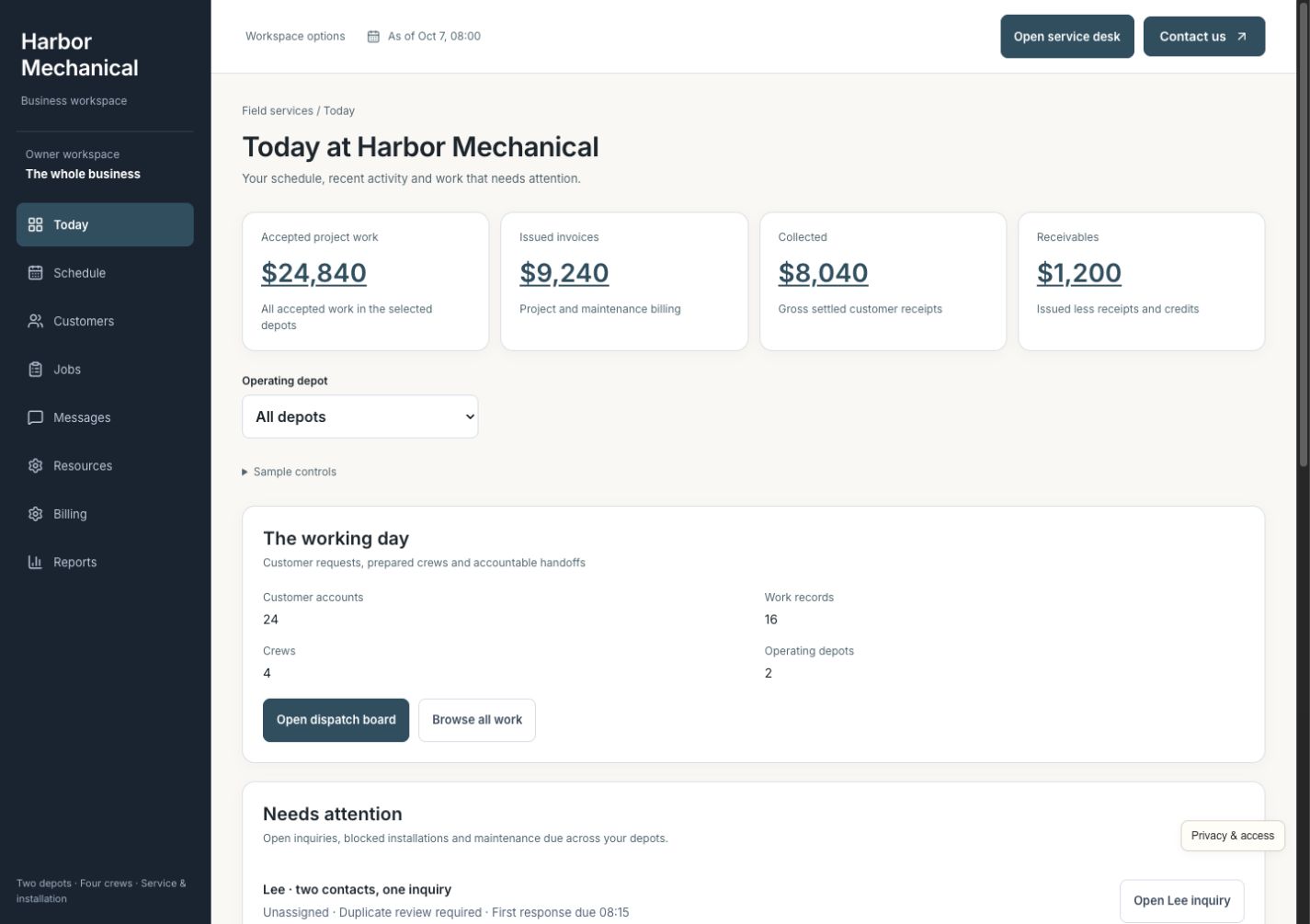
Today
See jobs today, missing equipment, approvals waiting for a customer, and outstanding balances. Open the underlying record and the responsible person so a readiness problem can be resolved before it becomes a wasted visit.
Custom software for established service businesses
Customer requests, crew schedules, equipment, job updates, and payments—together in a system built around the way your office and field teams work.
A working business. Fictional data. Built to show what’s possible.
One situation. Every next step connected.
A $12,600 installation is won, but the work is only beginning. Maya's phone call and web request need one job record. The right equipment and crew must be ready. Extra work needs approval. The office needs completion evidence before it can bill correctly.
Match Maya's phone call and web request to the same customer and property. Review the $12,600 installation estimate and open her approval page. Keep the agreed scope, acceptance, and person responsible together instead of creating competing job records.
Record the deposit separately from the accepted estimate. Check equipment, property access, and crew availability and qualifications before reserving a team. Confirm the arrival message with the same details the office and installers will use.
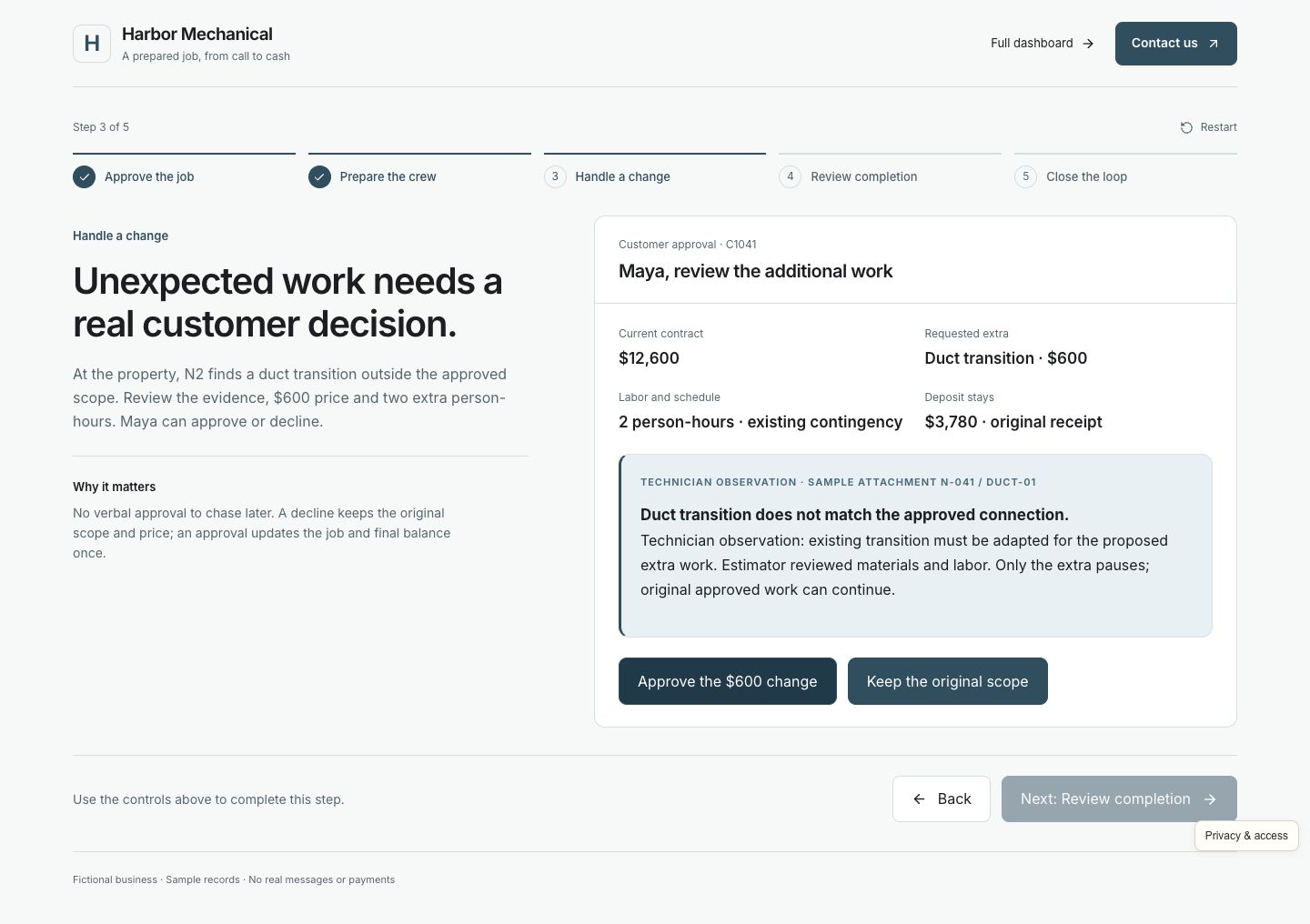
The installer finds additional duct work. Review the evidence, $600 price, and added labor, then open Maya's customer approval. She can approve or decline; only approved work joins the job and changes the final balance.
Work through the technician's mobile checklist: equipment serial numbers, photos, commissioning checks, and outstanding issues. The office reviews the completed evidence before releasing the job for final billing. A finished visit and a billable job stay distinct.
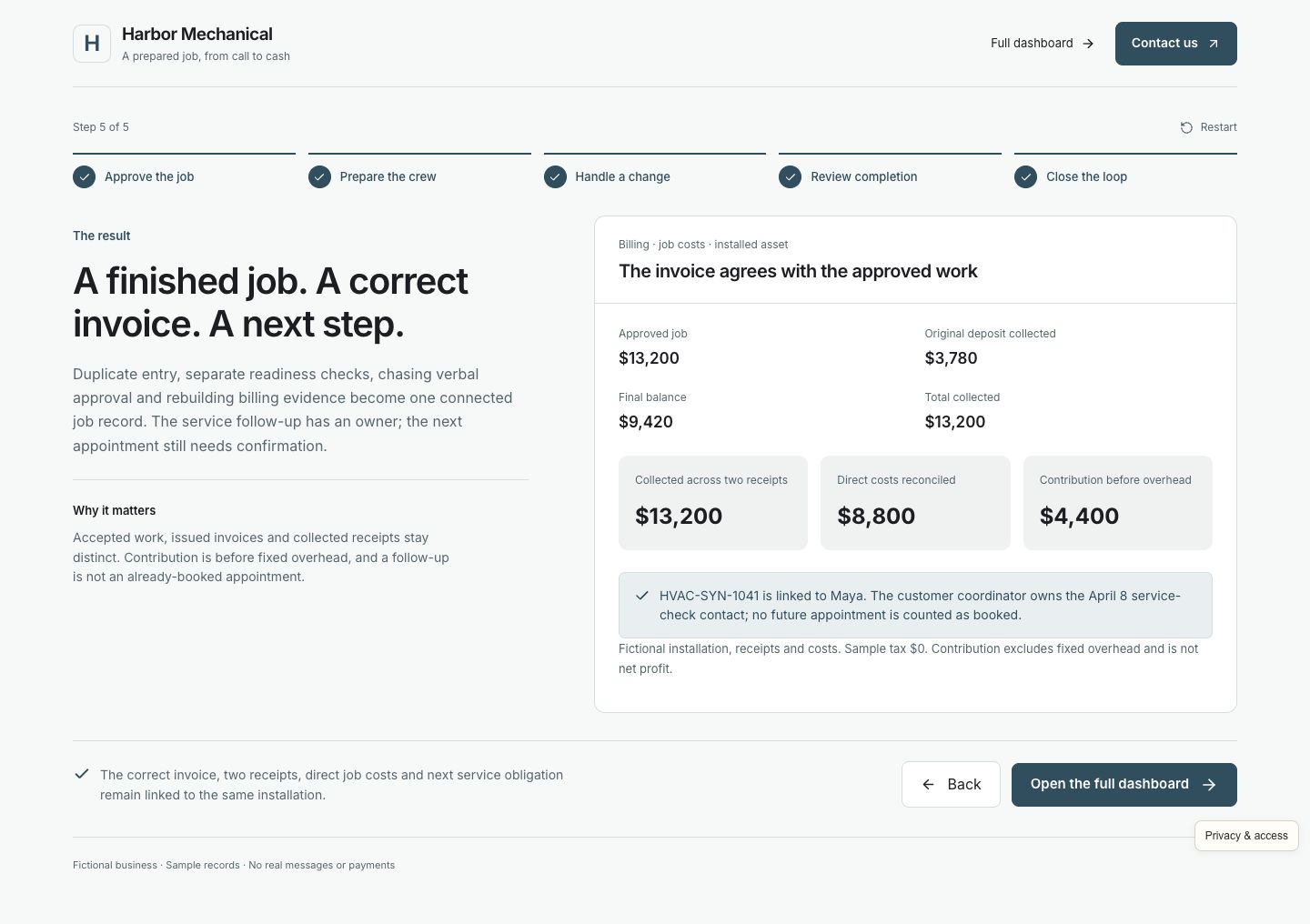
Issue the correct final invoice against the accepted work and separate deposit. Record the simulated balance receipt once. Review the job's modeled contribution before overhead, installed equipment record, and next service follow-up together.
Fictional walkthrough, not a client result. The initial estimate is $12,600; approving the $600 change brings authorized work to $13,200. Acceptance, invoicing, and collected receipts are separate. The deposit reduces the balance due rather than adding another sale. Contribution deducts the modeled job costs before fixed overhead; it is not net profit. No real customer is contacted or charged.
The whole business, together
The sale, installation, and payment depend on each other. Give the office, dispatcher, technician, and owner the same job context, with clear responsibility for the next decision.
See jobs today, missing equipment, approvals waiting for a customer, and outstanding balances. Open the underlying record and the responsible person so a readiness problem can be resolved before it becomes a wasted visit.
Keep contacts, site access, service history, installed equipment, and maintenance agreements together. Recognize repeat requests for the same property and give the crew the context it needs without another call to the office.
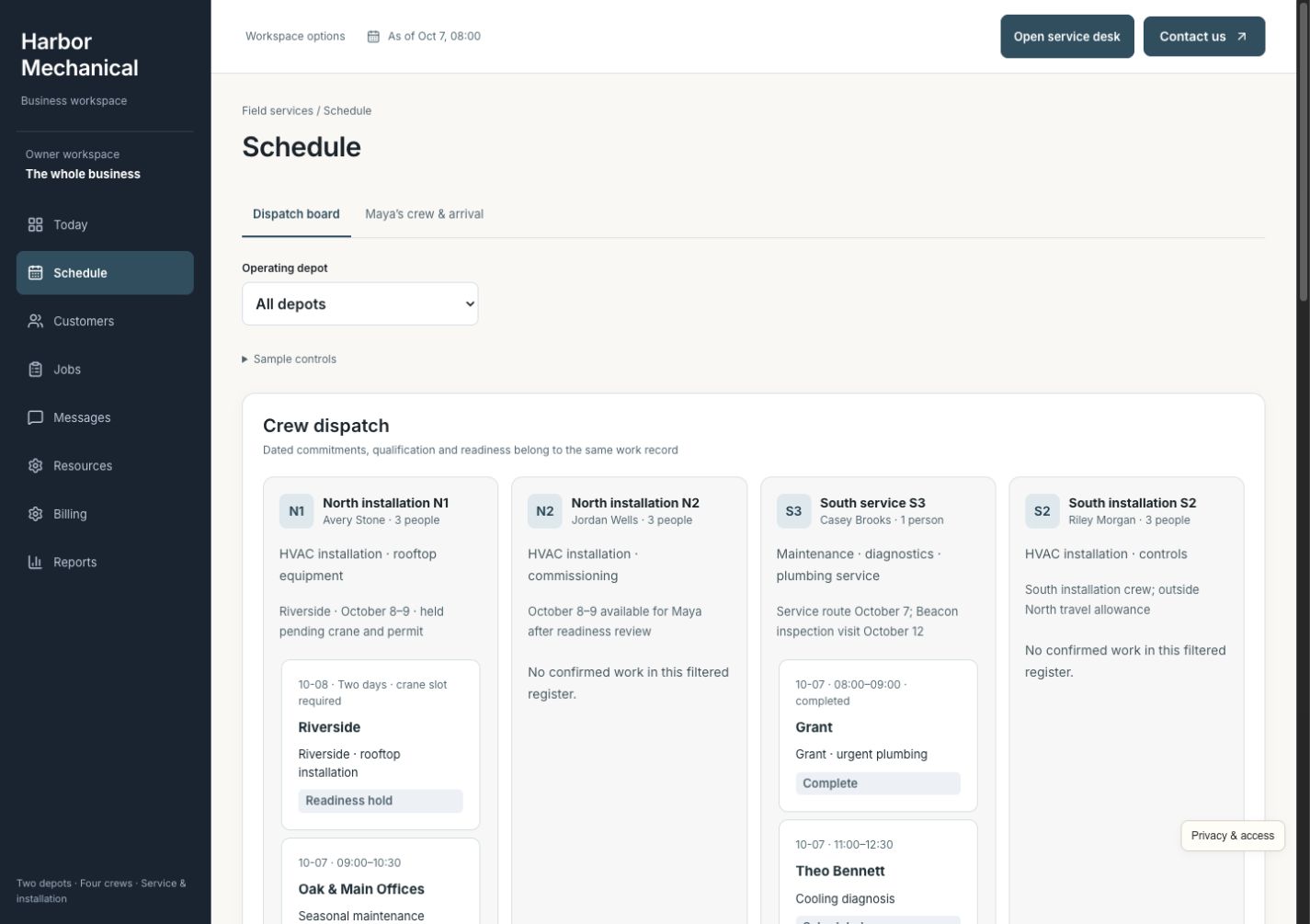
Compare crew qualifications, availability, depot, and existing assignments before promising a slot. Reserve the suitable team against a ready job, then give the office and technicians the same arrival and preparation details.
Carry the accepted scope into active work and callbacks. When extra work is discovered, attach the evidence, price, and labor for the customer to approve or decline. Keep the decision attached to the job and the final invoice.
Give technicians a focused checklist for serial numbers, photos, commissioning, and unresolved issues. Let the office review the evidence before billing so important closeout details do not depend on memory or separate messages.
Track purchasing, actual receipts, reservations, and shortages by depot. Know which equipment belongs to which job, and flag what still needs to arrive before the crew is dispatched.
Keep estimate follow-up, arrival messages, access questions, and customer replies with the job. For recurring maintenance, review access and purchase-order requirements, record findings, obtain separate repair approval, and set the next service obligation.
Review deposits, final invoices, collected receipts, and unpaid balances separately. Open the job costs behind contribution before overhead and inspect arrival performance without rebuilding the story from spreadsheets.
See the work getting done
Open any screenshot for a closer look. On a small screen, swipe across the preview.
For the dispatcher
A sold installation is not ready just because it has a date. Compare suitable crews with existing assignments, confirm equipment and access, and resolve the missing pieces before the arrival promise goes to the customer.
For the customer and technician
Maya sees what was found, why the duct work is proposed, and the $600 change. Her approval or decline stays with the job. The technician and office can work from the same decision rather than relying on a verbal agreement later.
For the office and owner
Review serial numbers, photos, commissioning, and outstanding issues before releasing the invoice. Then trace the separate deposit and balance receipt to the job, its installed asset, modeled contribution, and next service follow-up.
Built for the way you work
Harbor Mechanical is a fictional service business with 24 customers, 16 job and estimate records, four crews, and two depots. Its installation and recurring maintenance work make the operating details concrete. Your business does not have to follow this exact example.
Yours can reflect your trades, property and equipment records, crew qualifications, service areas, readiness checks, approval rules, deposits, maintenance agreements, team responsibilities, and reports. We focus on established businesses where a busy office and field team need reliable handoffs as the operation grows.
We review your existing estimating, scheduling, inventory, payments, and accounting software before agreeing what to connect or build. We check what your current providers support, decide which actions need staff or customer approval, and make those connections part of your custom implementation.
Walk through a real day with your team. Find the repeated admin, delays, and missing information that deserve attention.
Build around your operating rules. Check what your current providers support and agree which systems to connect.
Help the team use it comfortably, review the work in practice, and refine the steps that matter most.
Before you explore
No. The customers, properties, jobs, equipment, messages, approvals, and payments are fictional. You can try the connected workflows without sending real messages or collecting money. Prices, costs, and outcomes are sample data, not a claim about a client's results.
No. Installation and recurring maintenance make this example specific enough to show preparation, dispatch, customer decisions, and closeout. Your build can reflect your own trade, service rules, assets, work types, locations, and responsibilities.
Often, yes. We start with what works and check what your current providers support. Connections and responsibilities are agreed for your implementation; the demo does not imply every scheduling, payment, or accounting platform is already integrated.
You enter Maya's guided installation story, then can open the full working dashboard. No account, password, or email verification is needed. CIS receives your details and may follow up about your interest; optional demo activity is linked to your inquiry without sending contact details to analytics. Access is remembered in this browser for 30 days.
Picture a better business day
Follow Maya's installation, then explore the customers, crews, equipment, and daily decisions behind it.