Today
Start with classes, member follow-ups, coverage gaps, and payment issues that need attention. Find the responsible person and open the underlying record without piecing together a morning briefing.
Custom software for established gyms and fitness clubs
Member history, personal follow-ups, class bookings, coach coverage, and daily performance—together in a system built around the way your clubs run.
A working business. Fictional data. Built to show what’s possible.
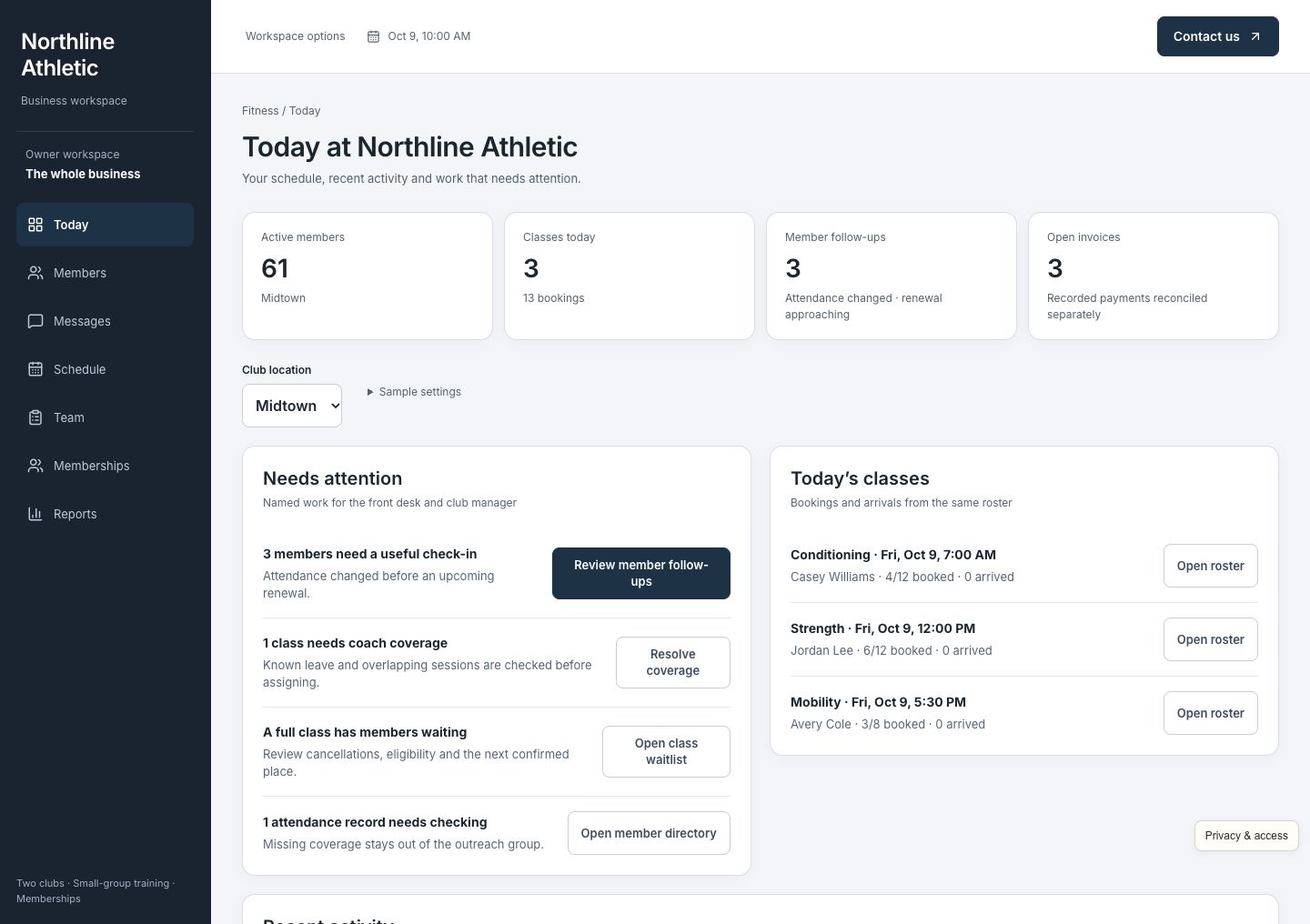
One situation. Every next step connected.
Morgan Ellis used to make three visits a week. Now it has been 18 days, with renewal approaching. A reminder alone will not explain why. Give a member of staff the context to ask, listen, and make returning easier.
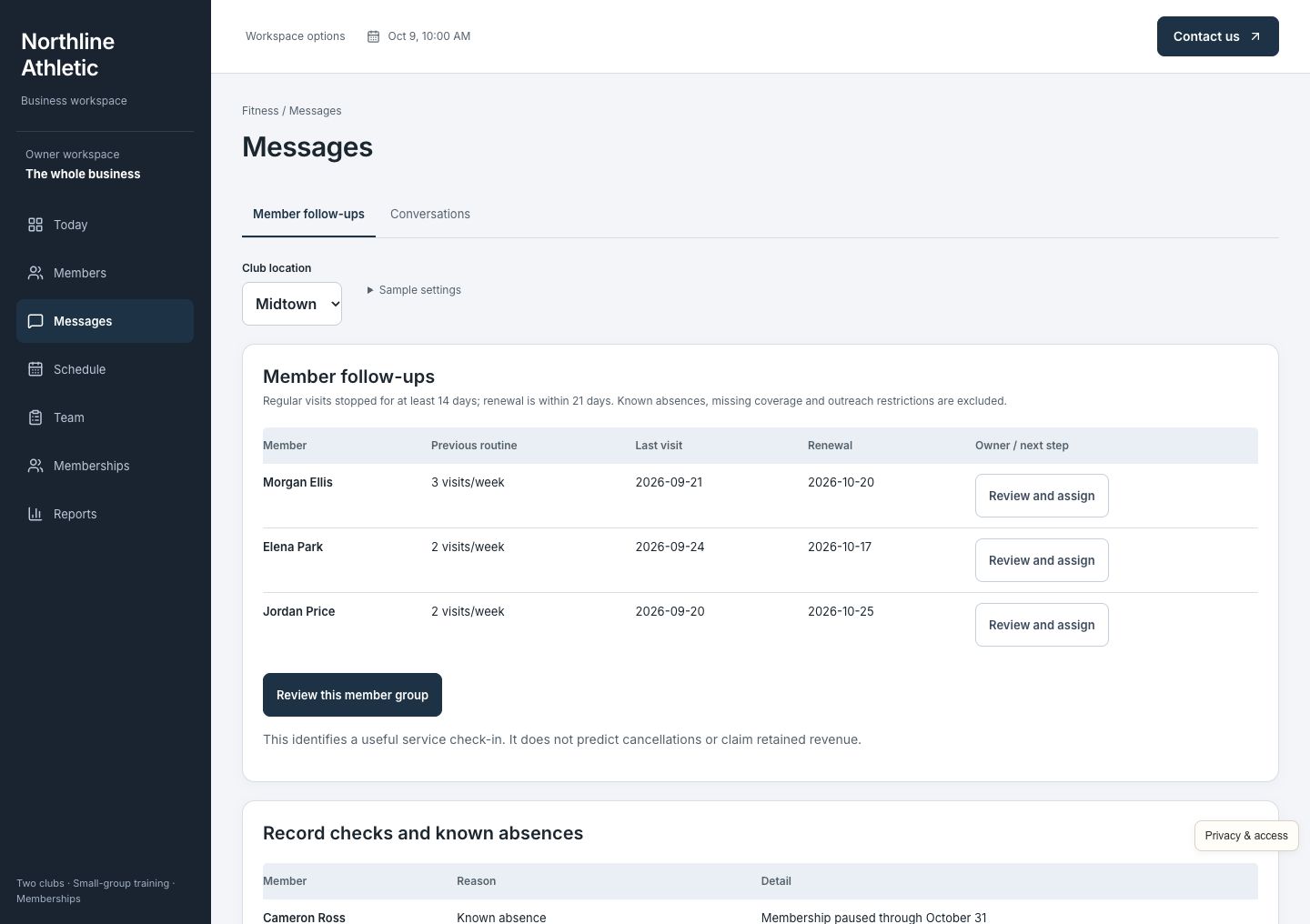
Review members whose regular visits have stopped. See the attendance history and renewal date behind each follow-up. Exclude paused memberships, known travel, contact permission restrictions, and incomplete attendance records that need staff review first.
Assign Morgan's follow-up to Jamie. Open the usual evening routine, recent visits, and upcoming renewal together. Review and edit a personal check-in before sending it, with one person responsible for the next step.
Send the reviewed message and read Morgan's simulated reply: work hours changed. Save the morning preference with the member record and find classes that fit. The conversation tells the team what to do next.
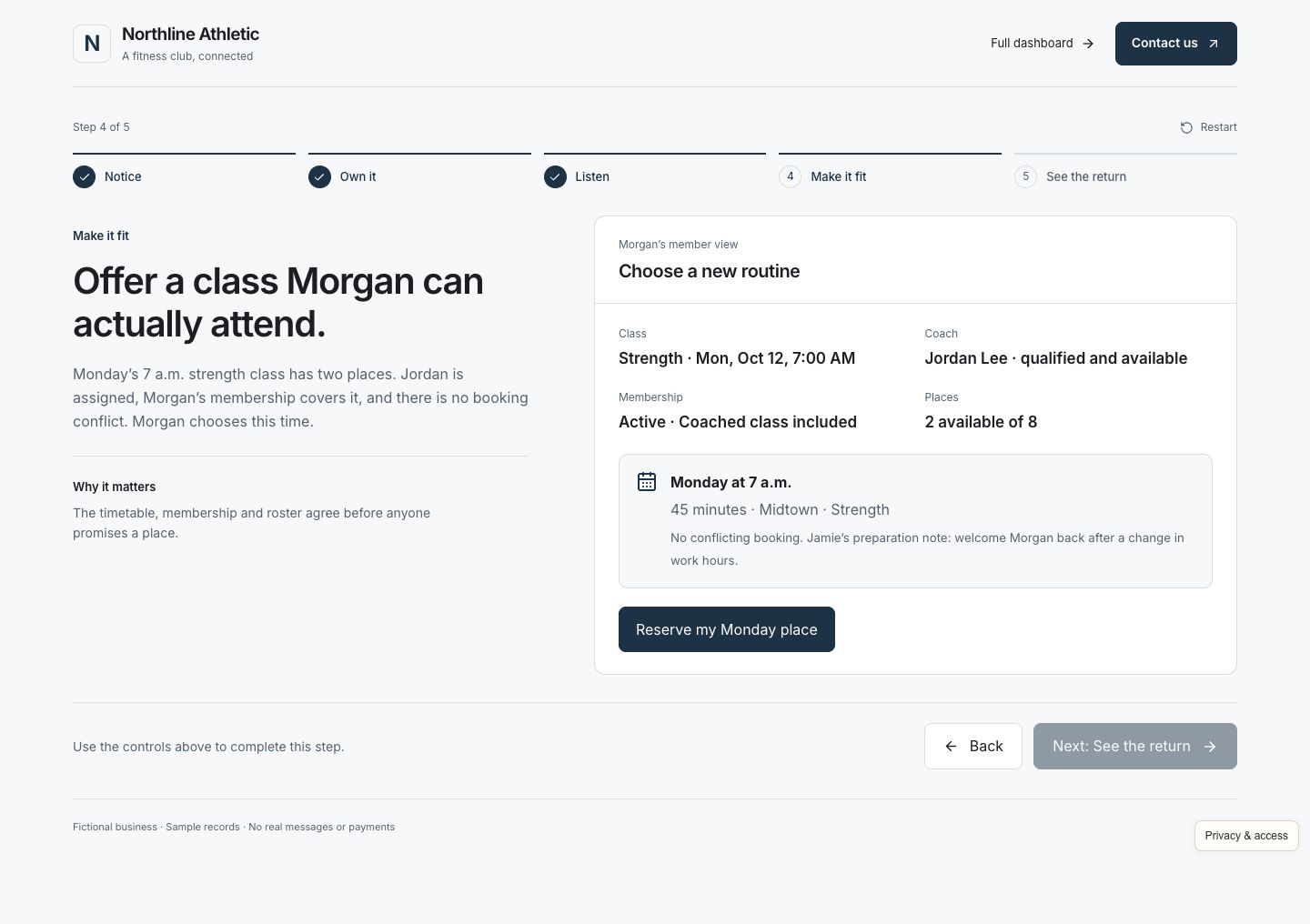
Open Morgan's member view and book the chosen 7 a.m. strength class. Check membership eligibility, capacity, and booking conflicts first. The roster and coach's preparation update together; the follow-up stays open until Morgan attends.
Advance to class day and record Morgan's check-in. The attendance history updates and the owned follow-up closes once. See contacted, booked, and returned members separately, with Morgan's October 20 renewal still ahead.
Fictional walkthrough, not a client result. A message is not a booking; a booking is not attendance. Morgan's check-in is an observed return, while renewal remains upcoming. This is not a claim of retained revenue or a forecast that someone will cancel.
The whole business, together
A good member experience depends on coordinated work behind the scenes. Give the front desk, coaches, and owner one place to understand a member's situation and keep the day's commitments.
Start with classes, member follow-ups, coverage gaps, and payment issues that need attention. Find the responsible person and open the underlying record without piecing together a morning briefing.
Keep attendance, usual routine, preferences, membership status, and staff ownership together. Review why a member needs a check-in and carry their reply into a useful next action.
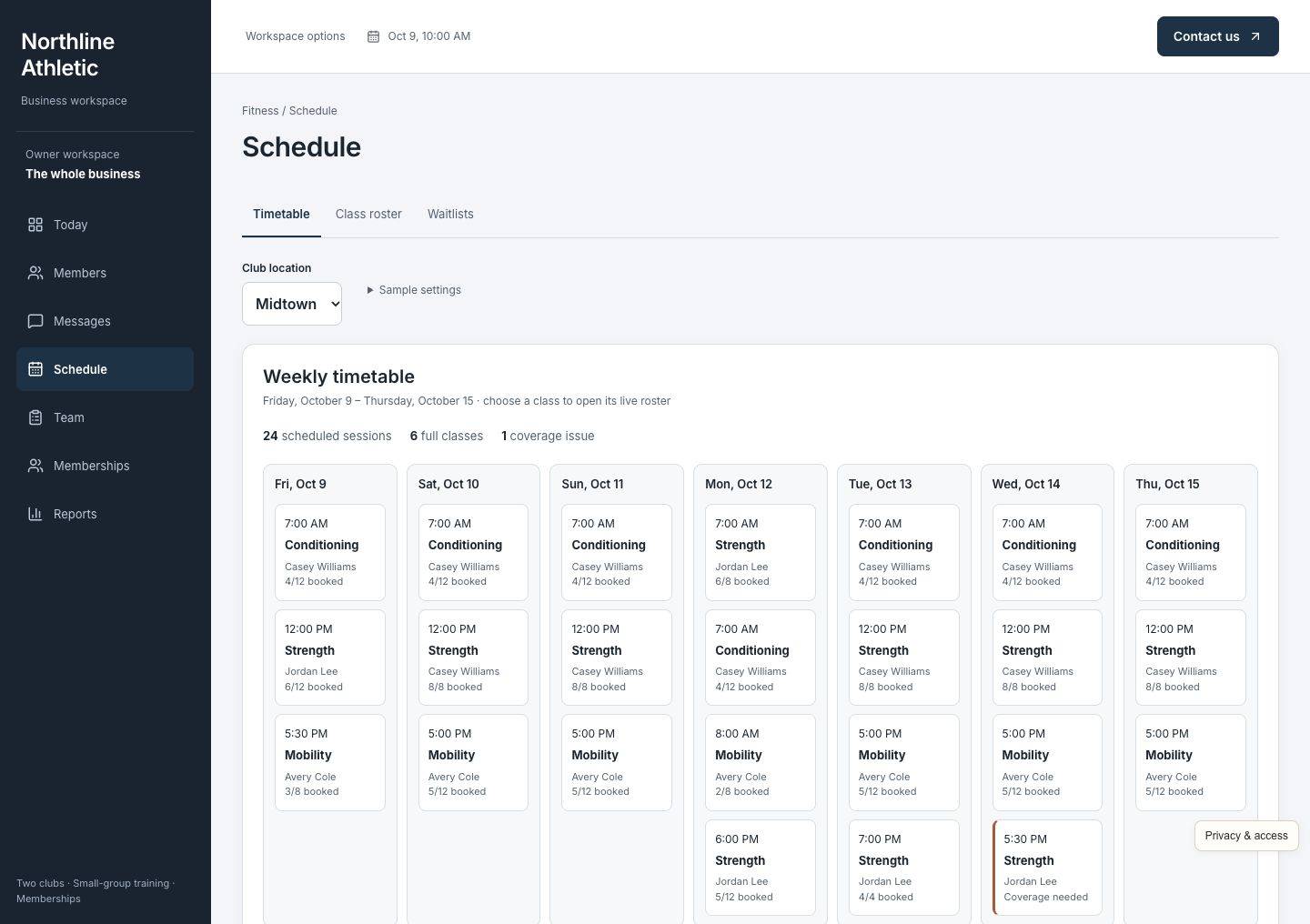
See the week across clubs, open a class, and manage its roster. Check capacity, membership eligibility, and conflicting bookings before promising a place. Give the coach the same booking details as the front desk.
When a place opens, review eligible waiting members and offer the available class. A successful claim updates the roster and remaining capacity so the same place cannot be filled twice.
Review personal check-ins with the member's attendance and preferences in view. Keep the message, reply, and follow-up in one conversation so colleagues can see what was offered and what happens next.
Review plans, renewal dates, pauses, balances, and payment records. Record a membership change or simulated payment through the member's account; an attendance return does not become a paid renewal.
Find a qualified, available coach when someone is absent. Compare the class requirements with skills and existing assignments before confirming cover, then update the timetable and preparation details together.
Review attendance trends, class utilization, member follow-up outcomes, and collected membership revenue. Open the records behind the totals and keep contacted, booked, returned, and renewed outcomes separate.
See the work getting done
Open any screenshot for a closer look. On a small screen, swipe across the preview.
For the front desk and membership team
Morgan appears because a regular pattern changed, not because every member receives the same campaign. See the reason, review absences and permissions, and give one colleague ownership. The follow-up stays connected to what the member actually says and does.
For the member and coach
Morgan can choose an eligible morning class with a real available place. The booking joins the member record, roster, and coach's preparation. When Morgan arrives, the check-in provides the evidence to close the follow-up.
For the club manager
See busy and quiet classes, open a roster, and resolve a coverage gap with a qualified, available coach. When a member cancels, use the eligible waitlist to fill the released place without overbooking the class.
Built for the way you work
Northline Athletic is a fictional two-club gym with 120 members, varied memberships, coached classes, and a team that shares responsibility for the member experience. It makes the operating details concrete; your business does not have to work exactly like this example.
Yours can reflect your class formats, membership eligibility, booking windows, waitlist rules, pauses, staff responsibilities, coach qualifications, locations, and reporting. We focus on established gyms and fitness businesses where a busy team needs reliable follow-through as the operation grows.
We review your existing booking, membership, payment, and accounting software before agreeing what to connect or build. We check what your current providers support, define which decisions remain with staff, and make those connections part of your custom implementation.
Walk through a real day with your team. Find the repeated admin, delays, and missing information that deserve attention.
Build around your operating rules. Check what your current providers support and agree which systems to connect.
Help the team use it comfortably, review the work in practice, and refine the steps that matter most.
Before you explore
No. The members, attendance, memberships, classes, messages, and payments are fictional. You can try the connected workflows without contacting real members or collecting money. The example does not promise a retention rate or financial result.
Yes. The example demonstrates one specific club operation. Your build would reflect your members, class formats, eligibility and waitlist rules, locations, staffing, and priorities. We work out those details with your team before building.
Often, yes. We begin with what works and check what your current providers support. The connections and responsibilities are agreed for your implementation; the demo does not imply every booking, payment, or membership platform is already integrated.
You enter Morgan's guided story, then can open the full working dashboard. No account, password, or email verification is needed. CIS receives your details and may follow up about your interest; optional demo activity is linked to your inquiry without sending contact details to analytics. Access is remembered in this browser for 30 days.
Picture a better business day
Follow Morgan's return, then explore the members, classes, team, and daily decisions behind it.